| Sign In | Join Free | My infospaceinc.com |
|
| Sign In | Join Free | My infospaceinc.com |
|
| Categories | Transparent OLED |
|---|---|
| Audio system: | Built-in 10 W X 2 Speakers |
| Brightness: | 400nits (center 1 point.typ.) |
| Type of backlight: | OLED self-luminous |
| Screen Size: | 30 inch |
| refresh rate: | 120Hz |
| Viewing Angle: | Min 60/60/60/60 |
| Standard colours: | 1.07B 10Bit |
| Panel transparency: | 38% |
| Resolution: | 1080×1920 |
| Appearance Color: | White/Black/Customization |
| Brand Name: | ZXTLCD |
| Model Number: | ZXTLCD-OD003 |
| Certification: | CE/Rohs/FCC |
| Place of Origin: | Guangdong, China |
| MOQ: | 1 |
| Price: | negotiable |
| Payment Terms: | L/C,T/T |
| Supply Ability: | 2000 pcs per month |
| Delivery Time: | 3-5 working days |
| Packaging Details: | wooden case, carton, flight cases are optional |
| Company Info. |
| Shenzhen ZXT LCD Technology Co.,Ltd |
| Verified Supplier |
| View Contact Details |
| Product List |
The 30-Inch HD Interactive Transparent OLED Display combines touch interaction with a see-through digital surface. Visitors can explore product information, guided content, comparisons, or branded media while continuing to see the physical product or environment behind the panel.
Its compact 30-inch format is suited to close-range applications where one visitor interacts with the screen for a short period. Typical locations include retail counters, exhibition fixtures, museum displays, reception areas, product demonstration tables, and guided sales environments.
The screen works best when the interaction is focused. It should help the visitor complete one clear task rather than present a complicated website-style interface.
A visitor approaching an unfamiliar transparent display needs to understand three things immediately:
The opening screen should provide a short instruction such as “Touch to Explore,” “Select a Product,” or “Discover the Collection.” A visible button or controlled animation can signal that the panel is interactive.
Avoid beginning with a long promotional video or several competing menu choices. The first interaction should feel obvious without staff explanation.
A close-range interactive display should use a shallow navigation structure. Most visitors will not explore a large number of pages.
A practical user journey may include:
Introduce the product, collection, exhibit, or service with one clear message.
Allow the visitor to choose a product, topic, language, or information category.
Present key details using short text, images, animation, or video. Keep the physical item behind the screen visible.
Offer a useful next step, such as viewing another feature, comparing an option, scanning a QR code, or requesting assistance.
Return automatically to the home screen after the visitor finishes or after a defined period of inactivity.
This structure keeps the experience accessible to first-time users.
The screen is large enough for clear close-range content but should not be treated like a desktop monitor filled with small controls.
Interface elements should be easy to recognize and touch. Use:
Important controls should remain within a comfortable reach area based on the final installation height and orientation.
| Display Size | 30 inches | ||
| Backlight Type | OLED | ||
| Display Resolution | 1366*768 | ||
| Display ratio | 16:9 | ||
| Brightness | 200-600d/mt Automatic Adjustment | ||
| Contrast ratio | 135000:1 | ||
Visibility | 178*/178 | ||
| Response time | 0.1ms(Gray To Gray) | ||
| Color Depth | 10bit(R),1.07 billon colors | ||
| Interface | |||
| Input Interface | USB*1+HDMI*1+DC*1 | ||
| Power Supply Parameters | |||
| Power Input | DC24V | ||
| Total Power Consumption | <90W | ||
| Operating Environment | |||
| Operating Time | 7*16h | ||
| Life Span | 3000h | ||
| Operating Temperature | 0°C~40°C | ||
| Operating Humidity | 20%~80% | ||
| Structure | |||
| Material | Aluminum Profile + Tempered Glass + Sheet Metal | ||
| Dimensions | 1225.4*699.7*29.5(mm), see structural dimension diagram for details | ||
| Packaging Dimensions | TBD | ||
| Installation Method | Wall-mounted installation | ||
| Net weight/Gross weight | 6kg/8KG | ||
| Accessory list | Base, adapter, HDMI cable, remote control, certificate of conformity, warranty card | ||
| Others | One year warranty | ||
Transparent OLED creates value when digital content and a real object are designed together. A product, model, component, or exhibit behind the panel can become part of the interaction.
For example, the interface may allow a visitor to select a visible product and display:
Digital labels and animations should be positioned around the object instead of covering its most important features.
A conventional touchscreen interface may use solid menus and full-screen backgrounds. On transparent OLED, that approach can hide the physical scene and weaken the display effect.
For better results:
The interface should provide enough visual structure for usability without turning the screen into an opaque rectangle.
The same display may be used by casual visitors, sales consultants, or exhibition staff. Their information needs may differ.
Provide a short introduction, three or four key choices, and a simple action. The experience should be understandable within seconds.
Allow a consultant to access deeper product details, comparisons, options, or demonstration content during a customer conversation.
Use simplified navigation, language selection, and automatic reset behavior for continuous public use.
The interface can share the same visual system while presenting different depths of information.
Touch performance should be evaluated after the display is mounted. Frame design, protective materials, screen angle, height, and structural movement can affect the experience.
Testing should include:
Visitors should receive immediate visual feedback after every touch so they know the command has been accepted.

The result depends on glass reflections, background contrast, product lighting, and the distance between the visitor and the screen. Testing should use the same conditions the public will experience.
Review the display with:
If readability is poor, adjust the graphic contrast, background lighting, product position, or interface layout.
Interactive content needs ongoing ownership. Before handover, define who updates product data, manages language versions, approves content, restarts the application, and responds to software issues.
The display should return to a safe home state after each interaction. This prevents the next visitor from encountering an abandoned menu, paused video, or previous user’s selection.
Before launch, ask several people unfamiliar with the project to complete the intended task without instructions.
Observe whether they can:
If visitors hesitate, simplify the content hierarchy or navigation before changing the hardware.
The 30-Inch HD Interactive Transparent OLED Display is a strong option when a project needs short, intuitive interaction while preserving visibility of a physical product or environment.
Its effectiveness comes from a clear first action, shallow navigation, open transparent content, reliable touch feedback, and automatic recovery. When these elements are tested with real visitors, the display can turn a compact product area into a practical and engaging discovery experience.

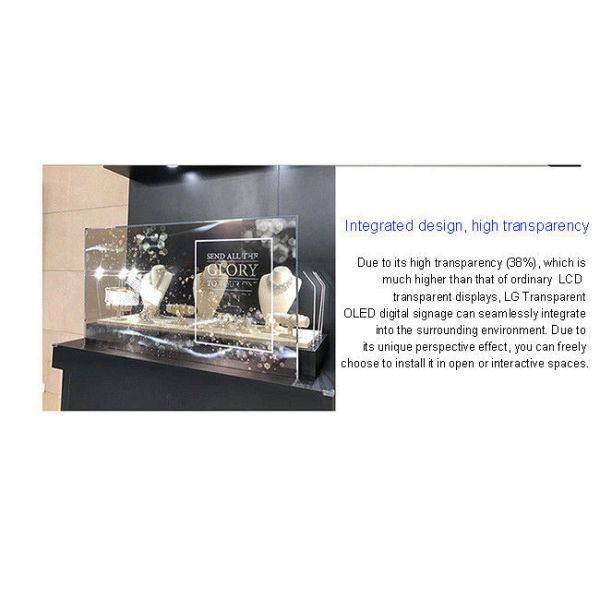
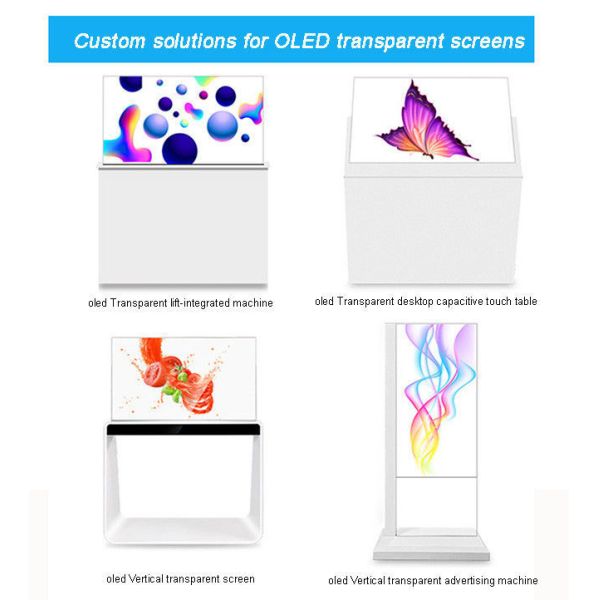
Transparent OLED Display have evolved from science fiction concepts into a key element defining the future of commercial, cultural, and public spaces. By choosing our customized solutions, you gain more than just a screen; you gain a strategic visual system that is deeply integrated into your spatial DNA and precisely serves your business goals.
If you would like to get the specification about above product, or you hope to discuss your requirements or need any additional information on our this product , then please do not hesitate to send us a inquiry and contact our sales team now.

|
 New Style 55-Inch Floor Stand Indoor And Super Narrow Frame Android Smart Transparent OLED Screen
Double Sided Transparent OLED Display Module Smart TV Display Cabinet Digital Signage And Displays Advertising Players Exhibitions
High-end 30 Inch Transparent Oled Self-luminous Mobile Advertising Screens 4K Indoor Digital Humans
55 Inch Interactive Touch Advertising Screen Smart OLED Transparent Advertising Display Cabinet for Exhibition Jewelry Luxury Display
55 Inch OLED Mobile AI Digital Human IG Transparent OLED Displays Interactive Display For Museum And Hotel
Android Operating System See Through Display Custom 55 Inch AR OLED Transparent Display for Store Mall Exhibition Museums
30 Inch Wholesale OLED Transparent Advertising Screen High Definition Capacitive Touch Transparent OLED TV For Exhibition Mall
55-inch Wall-mounted Ultrathin OLED Transparent Display Manufacturers Aluminum Alloy Frame For Store Showroom
55 Inch Indoor HD Touch Transparent Display Unit for Smart Commercial Display and Interactive Digital Signage
77 Inch Transparent OLED Clear Display Cabinet Touch Screen Digital Kiosk with Aluminum Alloy Frame and Pen/Finger Touch Writing Method
New Style 55-Inch Floor Stand Indoor And Super Narrow Frame Android Smart Transparent OLED Screen
Double Sided Transparent OLED Display Module Smart TV Display Cabinet Digital Signage And Displays Advertising Players Exhibitions
High-end 30 Inch Transparent Oled Self-luminous Mobile Advertising Screens 4K Indoor Digital Humans
55 Inch Interactive Touch Advertising Screen Smart OLED Transparent Advertising Display Cabinet for Exhibition Jewelry Luxury Display
55 Inch OLED Mobile AI Digital Human IG Transparent OLED Displays Interactive Display For Museum And Hotel
Android Operating System See Through Display Custom 55 Inch AR OLED Transparent Display for Store Mall Exhibition Museums
30 Inch Wholesale OLED Transparent Advertising Screen High Definition Capacitive Touch Transparent OLED TV For Exhibition Mall
55-inch Wall-mounted Ultrathin OLED Transparent Display Manufacturers Aluminum Alloy Frame For Store Showroom
55 Inch Indoor HD Touch Transparent Display Unit for Smart Commercial Display and Interactive Digital Signage
77 Inch Transparent OLED Clear Display Cabinet Touch Screen Digital Kiosk with Aluminum Alloy Frame and Pen/Finger Touch Writing Method

